Connect locally
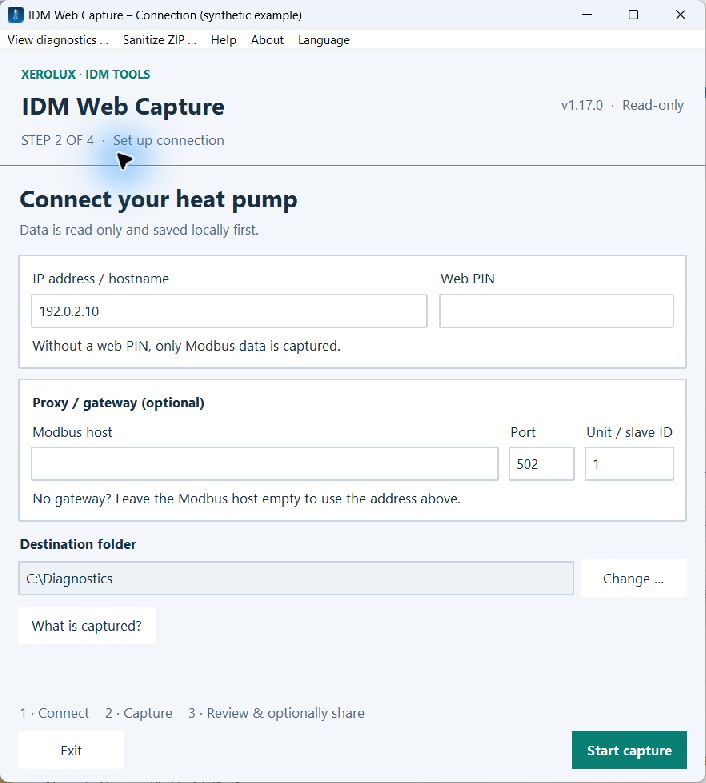
Enter your Navigator’s IP address and web PIN. A Modbus proxy/gateway can use a separate address, port and unit ID.
Improve the IDM integration · Version 1.19.9
IDM Web Capture reads diagnostics from your Navigator heat pump and saves a ZIP on your computer. Recognized direct device, network and personal identifiers are removed before saving. An optional private upload is used exclusively to improve the IDM integration for Home Assistant.
IDM Web CaptureREAD-ONLY DIAGNOSTICS
Navigator 2.0 HTTP
Navigator 10 WebSocket
Navigator 1.0 / 1.7 Modbus / FC01
Known Modbus addresses FC03 / FC04
✓ Recognized identifiers removed
✓ Local ZIP with SHA-256 ledger
✓ Nothing uploaded automaticallyLOCAL FIRST
Enter your Navigator’s IP address and web PIN. A Modbus proxy/gateway can use a separate address, port and unit ID.
The tool reads known web pages, advertised menus and Modbus addresses. It records failures and coverage limits, sanitizes recognized identifiers and creates file checksums.
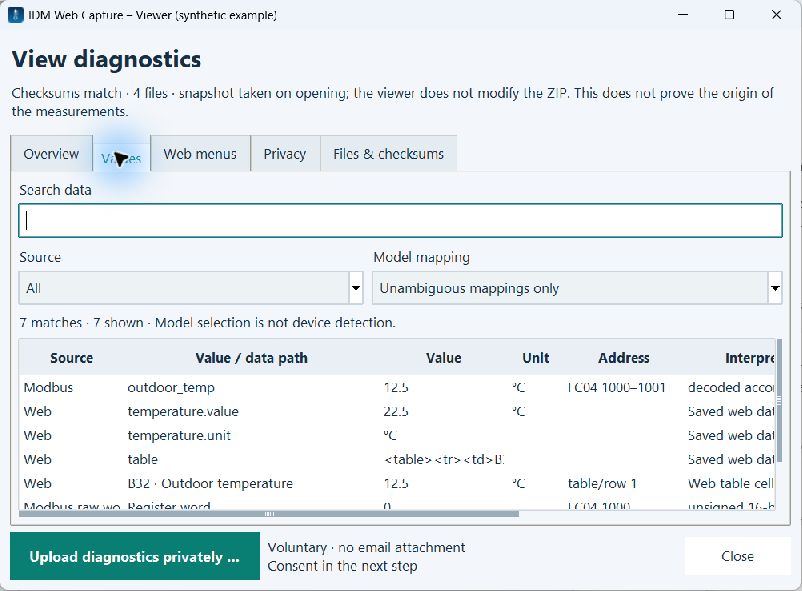
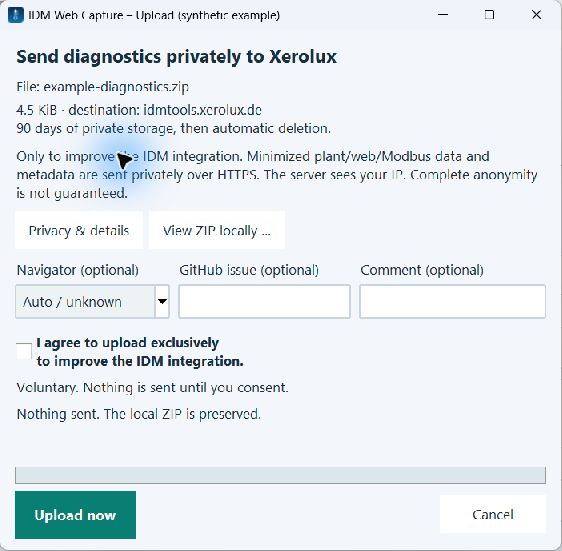
Inspect values, menus and privacy hints in the local viewer. If you wish, consent to a private upload. No account or email attachment is needed.
01 / DOWNLOAD
Extract the complete ZIP and open IDM Web Capture.lnk. Keep the entire folder. Python 3.15.2 and offline licenses are included.
Download Windows ZIP · 15.9 MiB ↓SHA-256
8c66988f36c6195b6a0176934b7d701f36ebdf4015d16f9739b7bdfee2d3507dRequires installed Python 3.11+. Run ./idm-web-capture <IP-address> or ./idm-web-capture --gui with Tk and a graphical session. No pip dependencies.
SHA-256
4725f3d18ee2475e267ad73976baa841d8f4aaa4c3dc4957bacf6283431ac9c0Uses the system Python on x86/32-bit, x64, ARM32 or ARM64. Executed on Ubuntu x64; other CPUs are source-compatible targets, not hardware-tested packages.
The full source package includes companion modules, catalogs, language files, tests and build scripts. Keep them together. Windows x86/ARM64 require a matching official Python; Windows ARM32 is unsupported.
Download complete source ZIP ↓Source archive SHA-256
df542d731c13b985304d32e69bed9bfec0e54db9df934afe44b9f7124e96ce4cAutomatic mandatory signed updates and restart on Windows and Linux/source clients, with offline local use preserved. Current captures are preferred, and older versions remain accepted for upload. Failed web authentication has explicit recovery choices and sanitized diagnostic evidence. Existing donations remain stored.
The Windows package contains an original PSF-signed Python runtime. Our application and ordinary shortcut are unsigned. Windows Defender and SmartScreen may assess software differently. From 1.19.4 signed updates install and restart automatically before capture on Windows and Linux/source clients. Linux requires openssl; older source clients need one manual upgrade. Offline local use remains available. A known update or invalid verification blocks capture. Older captures remain accepted; current captures are preferred. Stored donations are preserved.
PREVIEW THE TOOL
Actual English version 1.17 screens with synthetic examples only. Open an image to enlarge it.
HELP IMPROVE THE IDM INTEGRATION
Additional captures are particularly helpful for underrepresented Navigator categories. Stored submissions from the last 90 days:
Loading aggregate statistics …
These are ZIP submissions, not unique people or plants. Categories come from user hints or observed interfaces, not verified model identities. Only aggregate numbers are public. Individual archives, comments and identifiers remain private. Updated approximately hourly. Privacy and context.
02 / VERIFICATION
No new VirusTotal report was created for 1.19.9. Microsoft Defender checked the extracted Windows package.
Look up this Windows ZIP hash ↗Microsoft Defender, definitions 1.463.433.0, reported zero detections for the complete extracted package.
Read the verification record ↗Tests cover read-only capture, privacy filtering, archive checksums, consent, access restrictions, encrypted storage, language selection and translated dialogs.
Download source, tests and build scripts ↓Software scans are point-in-time results for the exact software hash. Timeouts, unsupported or failed engines are not clean verdicts. This is separate from diagnostic uploads, which have no server-side malware scan. No future antivirus or SmartScreen acceptance is guaranteed.
Check the download source, version and SHA-256, and send the maintainer the exact message and file hash. Do not routinely disable antivirus protection. A complete source package is available for your own Python installation.
Your selected software archive stays in your browser. This check does not upload it.
No file selected.
03 / QUESTIONS
The tool attempts known pages, advertised web menus and documented read plans, and discovers additional local resources. No tool can promise every device-specific value or server-side source. Missing replies, permissions, unsupported addresses and discovery limits are explicitly recorded.
Recognized direct identifiers are removed, but technical data can remain distinctive. Your public IP is visible to the upload server, and comments/issues may identify you. Complete anonymity is not promised. Review the ZIP locally before sharing.
Explicit consent, certificate-validated HTTPS, ZIP format/size/hash checks, AES-GCM storage outside the public website and operator-only access with two-factor authentication. Archives are not executed or served as active web pages. There is no server-side malware scan. Retention is 90 days, then automatic cleanup.
You receive a reference number and a local .upload.json receipt. The server reviews response structures and emails the operator only for new technical findings. No extra email from you is needed. If delivery is not confirmed, metadata or bytes may already have arrived; sending again can create duplicates.
Exclusively improving the IDM integration for Home Assistant: fixing integration problems and improving Navigator, device, register and web-parser support. No public diagnostic sharing and no automatic external analysis-service upload.
Yes. The app follows your system language on first start and offers Language > Deutsch / English / System language. The website follows the browser language unless you select DE or EN. Your choice is stored locally. Captured controller text and original license notices retain their source language.
This tool is provided free of charge as part of the open-source IDM Heatpump for Home Assistant project (MIT license). Use it at your own risk. No guarantee or warranty of freedom from errors, availability or fitness for a particular purpose is provided. To the extent permitted by applicable law, the author and operator exclude liability for direct, indirect or consequential damage, including data loss or equipment damage. The tool is intended solely for the described read-only diagnostics and does not control the plant. External services and links have their own terms and privacy notices.
The MIT license covers our application code. Bundled Python and third-party components retain their own terms and copyright notices. Full original license texts are available offline in the package and on the licenses page. Mandatory statutory rights remain unaffected.
Donated before? A code derived from the serial number helps us group submissions from the same heat pump and compare changes. The serial number itself is not transmitted.
NAVIGATOR 10 is the heat-pump controller. NAVIGATOR Pro is the optional individual room control, for example for underfloor-heating zones. A WebSocket connection does not prove Pro equipment. The display includes legacy combined WebSocket categories under Navigator 10; stored submissions are unchanged.
Version 1.19.3 pauses if web capture fails. Correct the connection details, explicitly continue without web data, or cancel. A sanitized failure ZIP is preserved with detailed login evidence. Read the guide and troubleshooting advice.
The Windows bundle includes the CPython 3.15.2 security release. The Modbus catalogs are generated from API 2.17.0rc1. The viewer still decodes older 2.14.4 archives.